- Organize all links on one slide
- Variety of entry points
- Balance novelty with predictability
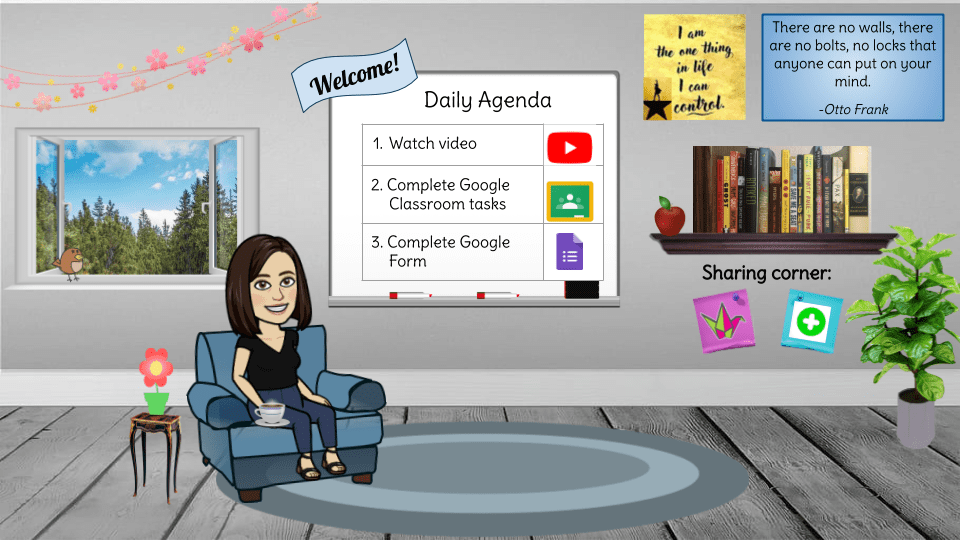
Ok the Bitmoji Classroom wasn’t from the spring. I wanted to make this for the fall. I have no idea how I’m going to use this. I can easily see it getting too busy with too many hyperlinks, but the idea is to have it be as streamlined as possible so I don’t have to change it much every day. Oh well. It was fun to make. And this one is a good visual summary of what DL looked like for me and my 7th grade team last year. Maybe I’ll just use it as my Google Classroom banner.
Intro Video
The YouTube link played a introduction or explanation video. I learned that students treated my video as a commercial. They try to skip it. I even tried to spice it up with music and a little show at the end updating them on the craziness that was two chihuahuas chasing geese they couldn’t win a fight against. It was like a little carrot. If you got all the way through it, you’d have a treat of insanely cute fails! The view count when from 4 per class to 1 or 2 per class, and I’m not convinced it wasn’t counting the time I watched my own video. So I learned: the videos MUST BE SHORT and to the POINT. I am aiming for 2 minutes tops, ideally with screen recordings of the activity to walk those through who need support with executive functioning. I don’t know how DL 2.0 will look with recording myself for asynchronous lessons, but that will be on my mind this year. Short and TO THE POINT! So… not like my blog post today.
Google Classroom Lesson & Activities
The Google Classroom (GC) link will take them to the classwork tab. I like having ONE assignment per day with the title and topic being today’s date. After one week, I reorganize them into one topic called “Past Weeks,” so they are still easy to find with the day as the assignment title. Each assignment will house all the links. Each trimester, I will probably restart on a new GC class to avoid long loading times from packed assignments.

Below is a playlist idea we tried last year. The focus was on engagement and review only. We were learning so much about what distance learning engagement looked like for different learning styles and home environments that we decided variety and choice were key, while balancing predictability. We created a playlist for the week and students could engage with it any way they wanted. The daily question posted in GC was the most popular. We had over 90% participation on some level.
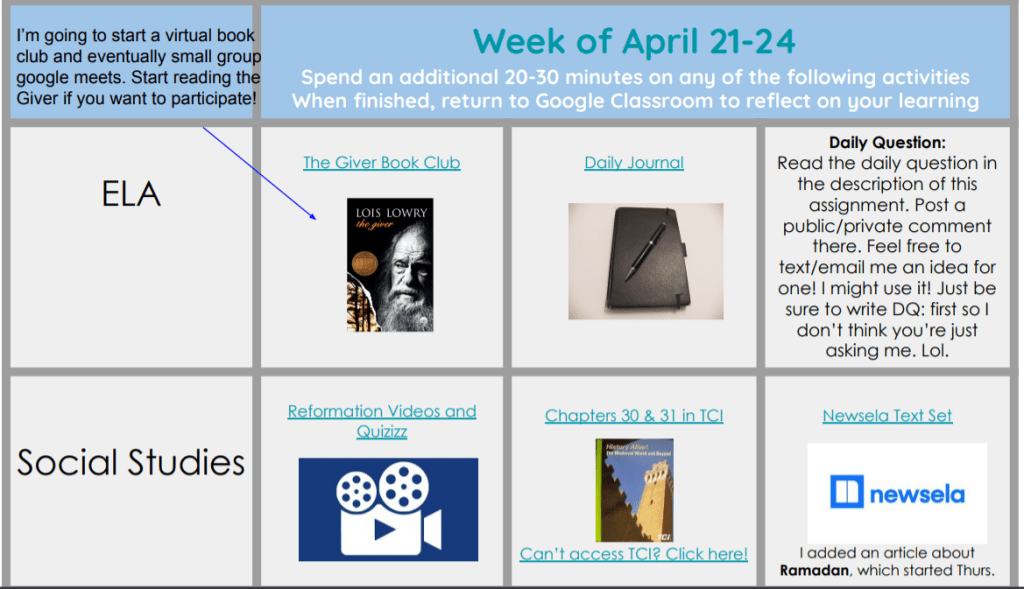
Listed here are the various activities in the playlist in order of popularity:


Various Playlists
Daily Question: Even students who didn’t engage easily in anything participated in this one. Think of a journal prompt or conversation starter like: Would you rather listen to your family members sing for an hour or dance for an hour? or Does ketchup belong on eggs? (The food questions were the most popular.) Here’s a link to a list of the questions I used. The DQ became a good way to check in with students to see who was still even on a basic level logging in each day. It also helped fill a little of the social-emotional community building bucket as students responded to each other with threads like a monitored version of social media. Only 1 student was inappropriate, and only that one time. My teacher look be fierce even from a distance. I answered the questions, too, or responded to students’ answers. It was fun!
ELA Reading Resources: We used a variety of online literacy programs and these were surprisingly popular. We used articles from NewsELA, CommonLit, and my favorite: ActivelyLearn. I found if I graded the ActivelyLearn activity in real time, students could see other students’ answers and they would request access to revise their answer to make it better. They did that. Without me asking them to. Revision is usually the broccoli of an ELA class, and they just like, asked for more. It was cuckoo bananas bizarre and I loved it. Thank you, ActivelyLearn.org. We also used Freckle, Quill, and Lexia Powerup, but the seemed less enthusiastic about those skill builders.
ELA Quickwrites and short writing tasks: We used NoRedInk’s writing prompts often and the students really engaged in the creative ones. I think what helped was that we copied and pasted their answers into a shared google slide with one student’s work per slide. The next day, we posted it for them to comment or give feedback on each other. Sometimes we posted it anonymously, other times we titled the slide with their name. I think this was another example of students being motivated by publication on some level, because they really did respond to each other. I had one or two private message me that they did not want me to post their work, but I also had a few that would message me that they didn’t see theirs on the slides and did I forget about them. So yes, publishing them was a great idea.
Listening Activities: We alternated reading and listening activities. Students really got into these. The most popular was the StoryCorps shorts that were animated. Shout out to Lila for putting these together!

We also used the Mars Patel podcast series, and one week we linked 35 Must-Watch TedTalks for Students. That was also a hit. I want to use This Land podcast series for 8th grade social studies, but I’m not sure how yet. Not something I’d want to facilitate distantly as there are mature themes that would benefit from guidance. It’s not one I’d send them off to check out without me.
Book Clubs: We did attempt to offer a book club on the Giver. Many students chose to read the book, but not as many as I would have liked. Those who chose to read it loved it. We gave them two ways to engage: read the PDF or listen to it, then answer some basic comprehension questions. That was the low floor. I had really hoped more would go on to the next step which was to dive into a collaborative google slide show and create a one pager out of their slide or slides. Each student was invited to create and manage their own slide in the slideshow and be able to peak on other students’ as well. I modeled with a video linked on the first slide how they might respond to one another, what kind of questions to pose, etc. Only two or three students even got started with that and then eventually abandoned it. I was so excited about it, too! Oh well. They did however, pose their own questions and wondering to me in the daily google form that I will get to later.
Social Studies

We gave them options to watch or read about the content that was in the chapter. Then used NewsELA’s textsets that went with our TCI history textbook. There didn’t seem to be a rhyme or reason to which activities they chose. Many did all of them. I think they were just interested in learning something new. We knew we wouldn’t be able to hold them accountable or expect them to really be responsible for learning it and would revisit what we could the next year, but they really seemed to enjoy learning about the new content.
Quizizz: We also made a Quizizz or Quizlet as some practice and a collaborative, gamified way for them to reengage with the content. I used the test questions from our textbook in the Quizizz so they at least were exposed to the types of questions they should be practicing. This seemed like a success, even though I missed being able to really TEACH it. It served its purpose.
Sharing!
Flipgrid is not awesome for introverts. It’s downright terrifying for some. So while I loved the idea of Flipgrid, I knew I couldn’t force my students to use it. Instead, I treated it as an invitation to share a message. I often gave a prompt to help get them going but it was open ended. Some just started using it as a video diary. Others stalked everyone else but never recorded anything themselves. I say that’s still meeting social-emotional needs. But I learned that Padlet could be a great alternative. So we would share two links. One was to an entire grade level’s Flipgrid so they could “see” each other (whoever felt like it anyway), and would share a link to a Padlet open to the whole grade level as well where they could write messages, or share pictures or memes or inspirational quotes. When both Flipgrid AND Padlet were options, more students participated. It was oil and vinegar. Separate they were deemed unsavory, but together helped kids make a social-emotional salad.

Seems like a lot
Even going through all this again seems like it should have been more overwhelming than it was. My computer had a LOT of tabs open. Onetab helped, but my screen was still really busy. I knew I had to offer a lot of different options to meet so many different student learning styles and interests to get and keep them engaged, but I also didn’t want to die under a mountain of data collection and tab scanning. Our solution was to create all these amazing activities but only ONE form per week that was recycled each day.
Here’s a link to one of the forms. So we didn’t have to create a new one each day. I used the question eliminator to ask students to self report what they had completed. For example, if a student clicked that they did not read the Giver, it would skip any question that had to do with it, so the form was de-cluttered. This was important, because we were asking them to put 20 minutes per day into Lexia building ELA skills, then spending 20-30 minutes on the Playlist options. The form needed to be basic, and not take too much time or cognitive load.
Workflow aka Organizing the Responses: Since we kept the same link live the whole week to the daily form, it was easy to organize the responses. Each morning, I would open the responses and duplicate the sheet By the end of the week I would have 5 tabs in the sheet. I would then re-title the duplicate with that yesterday’s date. Then go back to the original sheet and delete all the responses from yesterday so you only had the titles of the cells left. It will keep repopulating answers as students fill out that same form today. I also was able to then go to yesterday’s sheet and organize the data by last name to take attendance for that day. Then for anyone who didn’t fill out the form, I would go back over all the other links and DQ to find evidence of them participating on some level. That didn’t actually take that long.
Accountability: Whoever didn’t participate (usually less than 10% did not participate), I would email them directly or send a private comment to them asking how they are doing and that I noticed they hadn’t participated yesterday and if I can be of any help. I did not shame anyone. These were some scary times. There could be so many reasons a student didn’t engage. One student had parents who were both doctors and he had to move in with a cousin. Another had a single mom of 3 who was a nurse. That’s a lot to juggle and manage. Lead with compassion.
Nerdy alert: Once I knew who had participated, then I could start analyzing data and responding to students individually. That part was now made more fun because I could see what they had done or responded to in the form responses, and could target my feedback based on that.
More nerdiness: I also had fun resorting the cells by the last question which was about how they were doing. Anyone who checked the box that they were “loving this” made me a breathe a little easier. And anyone who reported feeling like it was complicated meant I’d reach out to them. Very few ever marked this option. Most said this was working for them. By the end only 1 student said it was complicated, but they had computer issues.
Most extreme nerdiness: I could also sort by who read the Giver, who learned something in social studies, etc. It felt more freeing to be able to get a handle on what they chose all in one place. God, I love excel and sheets.
In Closing… or… What the actual… or… OMG this is EXACTLY like double dutch: I had to go back to relearn the pattern of the ropes so I can jump back in again. OMG it’s SO not double dutch because they keep changing the pattern and how many ropes we have… it’s so not faaiiiiiirrrrr!!! Ok. I mostly wrote this for me because I can’t actually believe what we accomplished this spring. I will be starting at another school this year and was going back through everything to see what 2.0 could look like. Distance Learning 1.0 didn’t end up being as horrible as it could have been. I learned a ton and am much better prepared. Now I’m just trying (like everyone else) to gather as much creativity and ingenuity as I can to analyze what tools are the best to start with, understanding we will continue to learn and reinvent everything as we go. We’ll be ok. We got this (thanks, Cornelius Minor). Get your mantras in order, people. We are going to need them. Mine will be: Oh look at that panicky thought, it’s coming and… it’s going. Good job. Ugh.. why can’t I stop typing? I’m just word vomiting through my fingers now. I’m so sorry. I’m done. For sure. Really.

 Teacheree